
 ASD Pipeline
离线说话人检测 macOS 应用:焦点跟随与竖屏裁剪,下载即用A recoverable, testable, reusable local entry point for Active Speaker Detection
Features
核心能力Core Capabilities

内置 PyTorch、OpenCV、LR-ASD 与 ffmpeg 完整运行时,安装后不需要 Python 环境、不联网、不上传视频,Apple Silicon 上开箱即用。Extract, detect, track, score, and render are explicit stages that can be inspected and debugged independently.

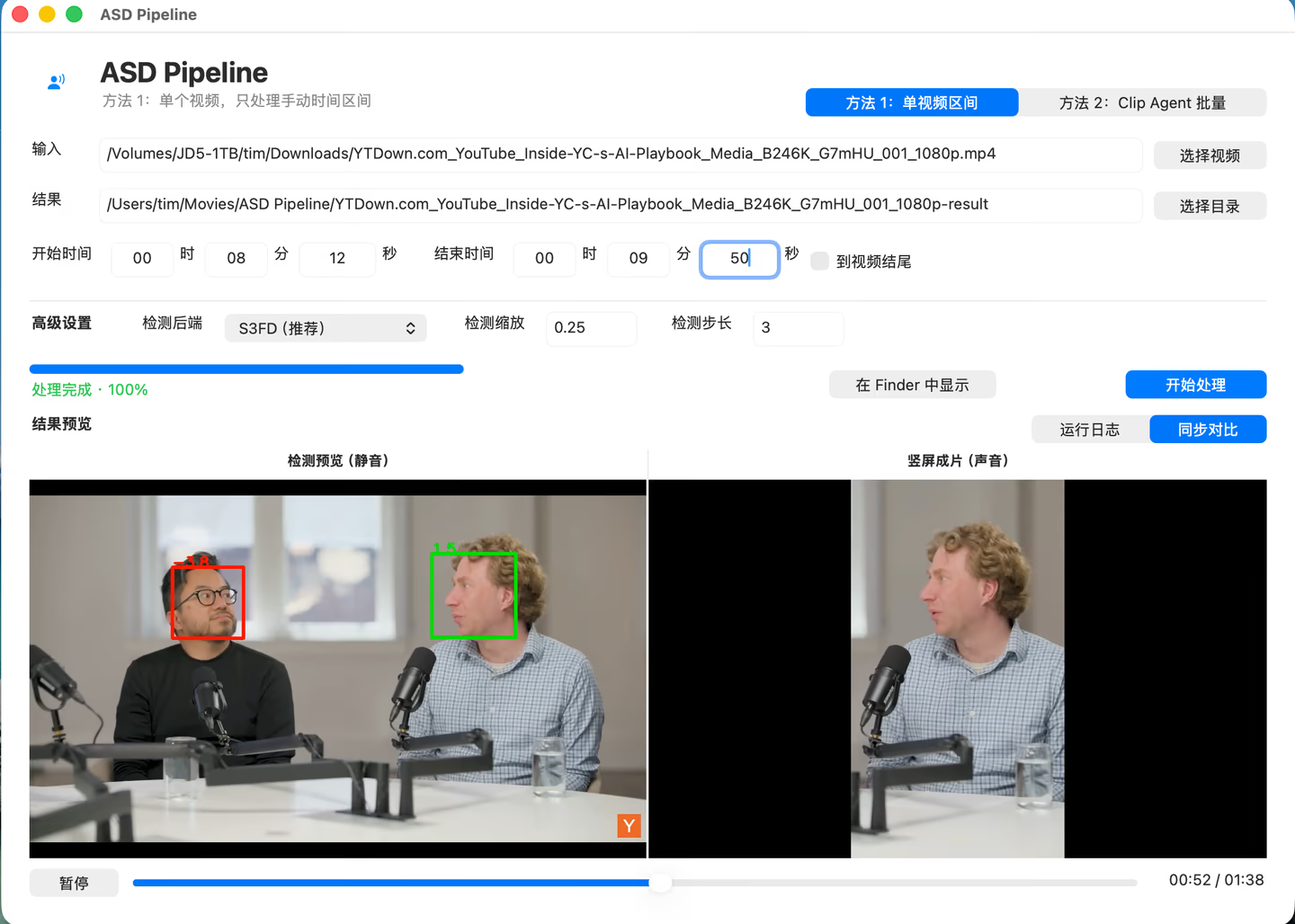
基于帧级说话人概率跟随当前说话人:短暂停顿保持焦点,连续强证据才切换,避免画面来回跳切。Resume from intermediate artifacts, skip completed stages, or force selected stages to run again.

按焦点轨迹导出以说话人为中心的 9:16 竖屏视频并回灌原音轨;中间结果落成结构化 JSON,可复核、可接下游。Tracks, frame scores, predictions, and other JSON artifacts are ready for analysis and integration.
Get & Install
获取与安装Get & Install
- 1 下载 DMG 镜像Download the DMG
点击「下载 macOS 版」,文件约 约 326 MB,托管在 GitHub Releases。Click "Download for macOS" — about 约 326 MB, hosted on GitHub Releases.
- 2 拖入 ApplicationsDrag to Applications
打开 DMG,把 ASD Pipeline 拖进 Applications 文件夹,即可像普通 Mac 应用一样使用。Open the DMG and drag ASD Pipeline into Applications — it then works like any Mac app.
- 3 首次打开First launch
构建未做公证签名:在访达中右键 app → 「打开」。也可以执行 xattr -cr "/Applications/ASD Pipeline.app" 清除隔离标记。The build is unsigned: right-click the app in Finder and choose Open. You can also run xattr -cr "/Applications/ASD Pipeline.app" to clear the quarantine flag.
Overview
这是什么What It Does
把 LR-ASD 说话人检测打包成开箱即用的 macOS 应用:内置完整离线引擎(PyTorch / OpenCV / ffmpeg),无需 Python 环境。支持说话人焦点跟随(停顿保持)、9:16 竖屏裁剪与结构化结果输出。An Apple Silicon workspace that turns LR-ASD from a one-off CLI run into a staged, resumable pipeline with structured artifacts.
面向 需要本地点视频找说话人、做竖屏裁剪的视频创作者与工作流开发者。Built for developers working on video understanding, speaker analysis, subtitles, and multimodal workflows.
更多说明More Details
原始的 ASD 基线更像一次性研究脚本:环境重、恢复弱、结果不透明。ASD Pipeline 把 LR-ASD 整理成阶段式、可恢复的本地引擎,并在这个引擎之上提供了开箱即用的 macOS 应用——下载一个 DMG,拖进 Applications,就拥有完整的离线说话人检测能力。
应用内置完整运行时(PyTorch / OpenCV / LR-ASD / ffmpeg),不需要 Python 环境、不联网、不上传视频。核心流程:检测画面中的人脸与说话概率,跟随当前说话人的焦点(短暂停顿保持,连续强证据才切换),并按焦点轨迹导出以说话人为中心的 9:16 竖屏视频,原音轨自动回灌。
除了图形界面,同一引擎也提供 CLI 与 Web API(/run、/run-pipeline、/run-tracked),每次运行输出 tracks、frame scores、predictions 等结构化 JSON 工件,适合作为下游视频理解与字幕工作流的能力模块。
Many ASD baselines behave like one-off research scripts: complete runs are expensive, recovery is weak, and intermediate state is opaque. This project makes every stage explicit and stores results as structured JSON.
Each run produces tracks, frame scores, predictions, metrics, and a validation overlay, making the pipeline useful as a reusable downstream capability.

